


base_model:
  - llava-hf/llava-onevision-qwen2-7b-ov-hf
datasets:
  - Code2Logic/GameQA-140K
  - Code2Logic/GameQA-5K
license: apache-2.0
pipeline_tag: image-text-to-text
library_name: transformers
This model (GameQA-LLaVA-OV-7B) results from training LLaVA-OV-7B with GRPO solely on our GameQA-5K (sampled from the full GameQA-140K dataset).
Evaluation Results on General Vision BenchMarks
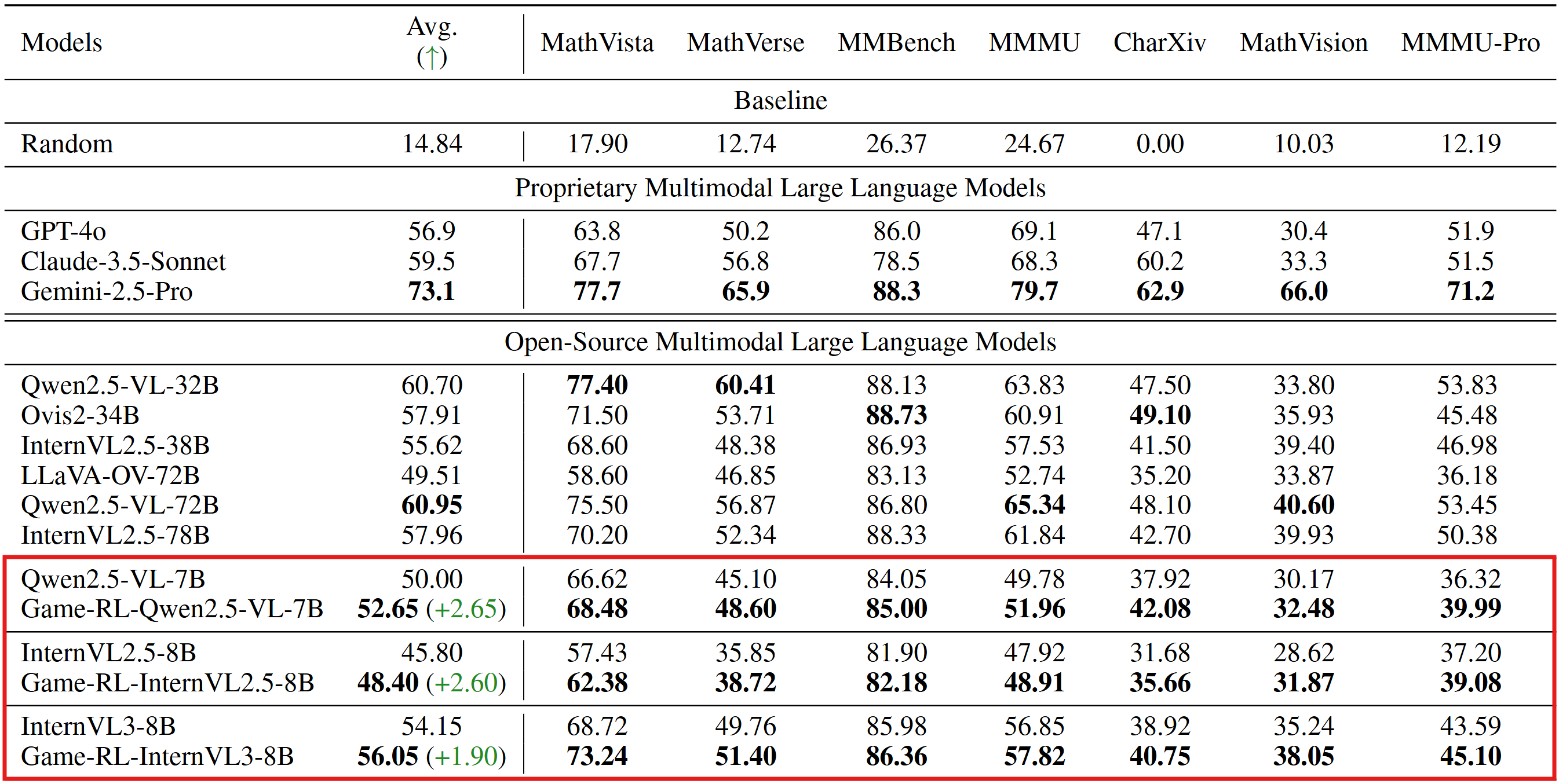
(The inference and evaluation configurations were unified across both the original open-source models and our trained models.)
Code2Logic: Game-Code-Driven Data Synthesis for Enhancing VLMs General Reasoning
This is the first work, to the best of our knowledge, that leverages game code to synthesize multimodal reasoning data for training VLMs. Furthermore, when trained with a GRPO strategy solely on GameQA (synthesized via our proposed Code2Logic approach), multiple cutting-edge open-source models exhibit significantly enhanced out-of-domain generalization.
[📖 Paper] [\ud83d\udcbb Code] [🤗 GameQA-140K Dataset] [🤗 GameQA-5K Dataset] [🤗 GameQA-InternVL3-8B ] [🤗 GameQA-Qwen2.5-VL-7B] [\ud83e\udd17 GameQA-LLaVA-OV-7B ]
News
- We've open-sourced the three models trained with GRPO on GameQA on Huggingface.
Usage
This model is compatible with the transformers library. Here's how to use it for image-to-text generation:
import torch
from PIL import Image
from transformers import AutoProcessor, AutoModelForCausalLM

model_id = "Code2Logic/GameQA-llava-onevision-qwen2-7b-ov-hf"

# Load processor and model
processor = AutoProcessor.from_pretrained(model_id)
model = AutoModelForCausalLM.from_pretrained(model_id, torch_dtype=torch.bfloat16).to("cuda")

# Load your image (replace with an actual image path or PIL Image object)
# Example: a screenshot of a GUI for a typical use case of this model
image = Image.open("your_gui_screenshot.jpg")

# Prepare your text prompt. The model is designed for multimodal tasks,
# so typical inputs involve both an image and a text query.
prompt = "What is highlighted in the screenshot? Provide a concise description."

# Construct the chat history format required by the model
messages = [
    {"role": "user", "content": [{"type": "image"}, {"type": "text", "text": prompt}]}
]
chat_prompt = processor.apply_chat_template(messages, tokenize=False, add_generation_prompt=True)

# Process inputs for the model
inputs = processor(text=chat_prompt, images=image, return_tensors="pt").to(model.device)

# Generate response
with torch.no_grad():
    generated_ids = model.generate(**inputs, max_new_tokens=100) # Adjust max_new_tokens as needed
    generated_text = processor.batch_decode(generated_ids, skip_special_tokens=True)[0]

print(generated_text)