

SSL4RL
Collection
Datasets and models in the paper SSL4RL: Revisiting Self-supervised Learning as
Intrinsic Reward for Visual-Language Reasoning
•
5 items
•
Updated
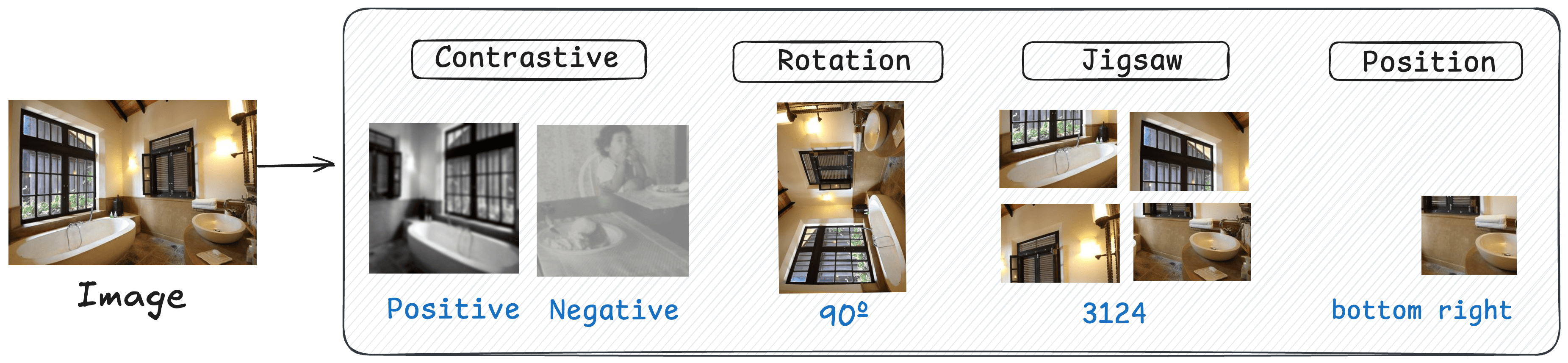
We propose SSL4RL, a novel framework that leverages self-supervised learning (SSL) tasks as a source of verifiable rewards for RL-based fine-tuning. Our approach reformulates SSL objectives—such as predicting image rotation or reconstructing masked patches—into dense, automatic reward signals, eliminating the need for human preference data or unreliable AI evaluators. Experiments show that SSL4RL substantially improves performance on both vision-centric and vision-language reasoning benchmarks, with encouraging potentials on open-ended image-captioning tasks. Through systematic ablations, we identify key factors—such as data volume, model scale, model choice, task difficulty, and semantic alignment with the target domain — that influence the effectiveness of SSL4RL tasks, offering new design principles for future work. We also demonstrate the framework’s generality by applying it to graph learning, where it yields significant gains.
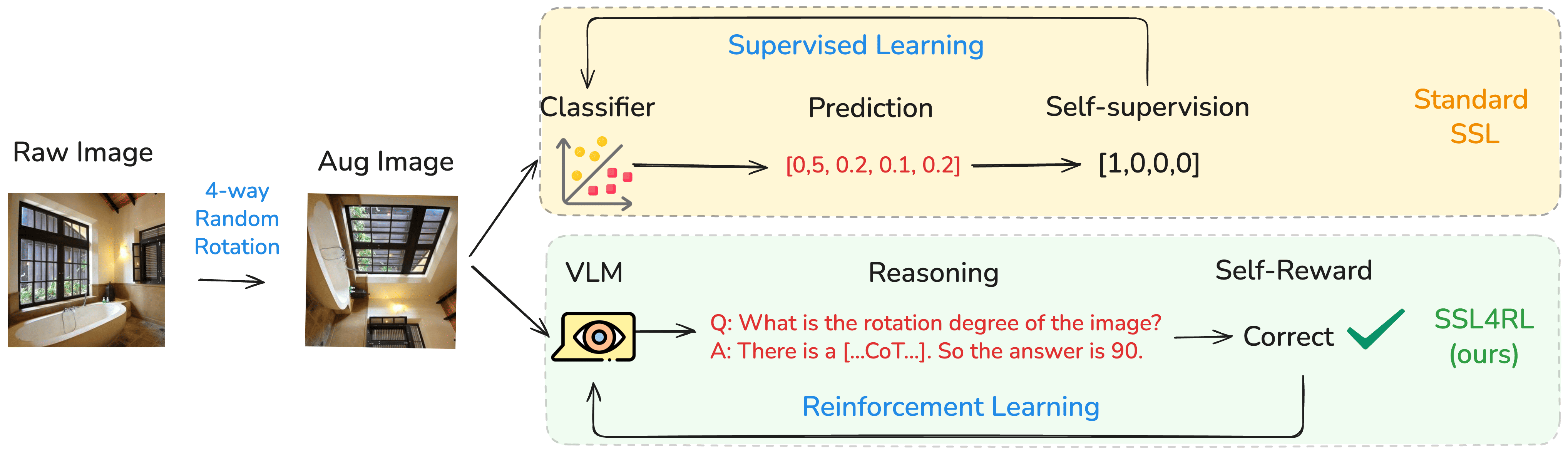
This model SSL4RL-MMBench-Rotation-3B is trained on the Rotation Task, which is built on the benchmark HuggingFaceM4/MMBench.
For training details, we recommend readers to our Paper SSL4RL: Revisiting Self-supervised Learning as Intrinsic Reward for Visual-Language Reasoning.
1️⃣ SSL as Intrinsic Reward Sharpens VLM Reasoning. The SSL4RL paradigm demonstrably enhances vision-language reasoning by repurposing SSL tasks as intrinsic rewards. It deepens the perception and understanding of the image itself, leading towards more precise visual attention and less language bias.
2️⃣ Task Choice is Critical. SSL tasks show effectiveness when their inherent semantic aligns with core reasoning skills, while an inappropriate task may induce negative transfer and hinder downstream performance.
3️⃣ Goldilocks Principle of Task Difficulty. The effectiveness of an SSL task is contingent on its difficulty being appropriately matched to the model's capacity. Insufficient challenge provides a weak learning signal, while excessive difficulty leads to negative transfer.
4️⃣ Non-additivity of Rewards. A naive combination of multiple SSL rewards does not yield cumulative improvements, indicating potential optimization conflicts and underscoring the need for sophisticated integration strategies rather than simple averaging.
| Category | Model | Logical | Relation | Attribute | Coarse | Cross-Inst. | Single-Inst. | Average |
|---|---|---|---|---|---|---|---|---|
| Base | Qwen2.5-VL-3B | 61.77 | 41.54 | 76.62 | 73.55 | 64.32 | 82.06 | 72.99 |
| SSL4RL | Rotation | 65.84 | 80.54 | 83.89 | 80.21 | 71.53 | 84.76 | 80.38 |
| ~ | Jigsaw | 62.86 | 74.51 | 80.35 | 77.92 | 67.82 | 84.31 | 77.82 |
| ~ | Contrastive | 61.12 | 73.42 | 71.81 | 65.38 | 58.39 | 78.50 | 69.27 |
| ~ | Position | 67.65 | 77.19 | 82.22 | 82.15 | 66.51 | 85.39 | 80.08 |
| Maximal Improvement | ↑ 5.88 | ↑ 39.00 | ↑ 6.77 | ↑ 8.60 | ↑ 7.21 | ↑ 3.33 | ↑ 7.39 |
The code of SSL4RL-MMBench-Rotation-3B has been in the latest Hugging face transformers and we advise you to build from source with command:
pip install git+https://github.com/huggingface/transformers accelerate
or you might encounter the following error:
KeyError: 'qwen2_5_vl'
Below, we provide simple examples to show how to use SSL4RL-MMBench-Rotation-3B with 🤗 Transformers.
The code of SSL4RL-MMBench-Rotation-3B has been in the latest Hugging face transformers and we advise you to build from source with command:
pip install git+https://github.com/huggingface/transformers accelerate
or you might encounter the following error:
KeyError: 'qwen2_5_vl'
We offer a toolkit to help you handle various types of visual input more conveniently, as if you were using an API. This includes base64, URLs, and interleaved images and videos. You can install it using the following command:
# It's highly recommanded to use `[decord]` feature for faster video loading.
pip install qwen-vl-utils[decord]==0.0.8
If you are not using Linux, you might not be able to install decord from PyPI. In that case, you can use pip install qwen-vl-utils which will fall back to using torchvision for video processing. However, you can still install decord from source to get decord used when loading video.
Here we show a code snippet to show you how to use the chat model with transformers and qwen_vl_utils:
from transformers import Qwen2_5_VLForConditionalGeneration, AutoTokenizer, AutoProcessor
from qwen_vl_utils import process_vision_info

# default: Load the model on the available device(s)
model = Qwen2_5_VLForConditionalGeneration.from_pretrained(
    "PKU-ML/SSL4RL-MMBench-Rotation-3B", torch_dtype="auto", device_map="auto"
)

# We recommend enabling flash_attention_2 for better acceleration and memory saving, especially in multi-image and video scenarios.
# model = Qwen2_5_VLForConditionalGeneration.from_pretrained(
#     "PKU-ML/SSL4RL-MMBench-Rotation-3B",
#     torch_dtype=torch.bfloat16,
#     attn_implementation="flash_attention_2",
#     device_map="auto",
# )

# default processer
processor = AutoProcessor.from_pretrained("PKU-ML/SSL4RL-MMBench-Rotation-3B")

# The default range for the number of visual tokens per image in the model is 4-16384.
# You can set min_pixels and max_pixels according to your needs, such as a token range of 256-1280, to balance performance and cost.
# min_pixels = 256*28*28
# max_pixels = 1280*28*28
# processor = AutoProcessor.from_pretrained("PKU-ML/SSL4RL-MMBench-Rotation-3B", min_pixels=min_pixels, max_pixels=max_pixels)

messages = [
    {
        "role": "user",
        "content": [
            {
                "type": "image",
                "image": "https://qianwen-res.oss-cn-beijing.aliyuncs.com/Qwen-VL/assets/demo.jpeg",
            },
            {"type": "text", "text": "Describe this image."},
        ],
    }
]

# Preparation for inference
text = processor.apply_chat_template(
    messages, tokenize=False, add_generation_prompt=True
)
image_inputs, video_inputs = process_vision_info(messages)
inputs = processor(
    text=[text],
    images=image_inputs,
    videos=video_inputs,
    padding=True,
    return_tensors="pt",
)
inputs = inputs.to("cuda")

# Inference: Generation of the output
generated_ids = model.generate(**inputs, max_new_tokens=128)
generated_ids_trimmed = [
    out_ids[len(in_ids) :] for in_ids, out_ids in zip(inputs.input_ids, generated_ids)
]
output_text = processor.batch_decode(
    generated_ids_trimmed, skip_special_tokens=True, clean_up_tokenization_spaces=False
)
print(output_text)
# Messages containing multiple images and a text query
messages = [
    {
        "role": "user",
        "content": [
            {"type": "image", "image": "file:///path/to/image1.jpg"},
            {"type": "image", "image": "file:///path/to/image2.jpg"},
            {"type": "text", "text": "Identify the similarities between these images."},
        ],
    }
]

# Preparation for inference
text = processor.apply_chat_template(
    messages, tokenize=False, add_generation_prompt=True
)
image_inputs, video_inputs = process_vision_info(messages)
inputs = processor(
    text=[text],
    images=image_inputs,
    videos=video_inputs,
    padding=True,
    return_tensors="pt",
)
inputs = inputs.to("cuda")

# Inference
generated_ids = model.generate(**inputs, max_new_tokens=128)
generated_ids_trimmed = [
    out_ids[len(in_ids) :] for in_ids, out_ids in zip(inputs.input_ids, generated_ids)
]
output_text = processor.batch_decode(
    generated_ids_trimmed, skip_special_tokens=True, clean_up_tokenization_spaces=False
)
print(output_text)
# Sample messages for batch inference
messages1 = [
    {
        "role": "user",
        "content": [
            {"type": "image", "image": "file:///path/to/image1.jpg"},
            {"type": "image", "image": "file:///path/to/image2.jpg"},
            {"type": "text", "text": "What are the common elements in these pictures?"},
        ],
    }
]
messages2 = [
    {"role": "system", "content": "You are a helpful assistant."},
    {"role": "user", "content": "Who are you?"},
]
# Combine messages for batch processing
messages = [messages1, messages2]

# Preparation for batch inference
texts = [
    processor.apply_chat_template(msg, tokenize=False, add_generation_prompt=True)
    for msg in messages
]
image_inputs, video_inputs = process_vision_info(messages)
inputs = processor(
    text=texts,
    images=image_inputs,
    videos=video_inputs,
    padding=True,
    return_tensors="pt",
)
inputs = inputs.to("cuda")

# Batch Inference
generated_ids = model.generate(**inputs, max_new_tokens=128)
generated_ids_trimmed = [
    out_ids[len(in_ids) :] for in_ids, out_ids in zip(inputs.input_ids, generated_ids)
]
output_texts = processor.batch_decode(
    generated_ids_trimmed, skip_special_tokens=True, clean_up_tokenization_spaces=False
)
print(output_texts)
For input images, we support local files, base64, and URLs. For videos, we currently only support local files.
# You can directly insert a local file path, a URL, or a base64-encoded image into the position where you want in the text.
## Local file path
messages = [
    {
        "role": "user",
        "content": [
            {"type": "image", "image": "file:///path/to/your/image.jpg"},
            {"type": "text", "text": "Describe this image."},
        ],
    }
]
## Image URL
messages = [
    {
        "role": "user",
        "content": [
            {"type": "image", "image": "http://path/to/your/image.jpg"},
            {"type": "text", "text": "Describe this image."},
        ],
    }
]
## Base64 encoded image
messages = [
    {
        "role": "user",
        "content": [
            {"type": "image", "image": "data:image;base64,/9j/..."},
            {"type": "text", "text": "Describe this image."},
        ],
    }
]
If you find our work helpful, feel free to give us a cite.
@article{guo2025ssl4rl,
  title={SSL4RL: Revisiting Self-supervised Learning as Intrinsic Reward for Visual-Language Reasoning},
  author={Guo, Xiaojun and Zhou, Runyu and Wang, Yifei and Zhang, Qi and Zhang, Chenheng and Jegelka, Stefanie and Wang, Xiaohan and Chai, Jiajun and Yin, Guojun and Lin, Wei and others},
  journal={arXiv preprint arXiv:2510.16416},
  year={2025}
}
Base model
Qwen/Qwen2.5-VL-3B-InstructTotally Free + Zero Barriers + No Login Required